


How Internal Dashboards Improve Lead Predictability
By Ray Advertising · Published May 18, 2026
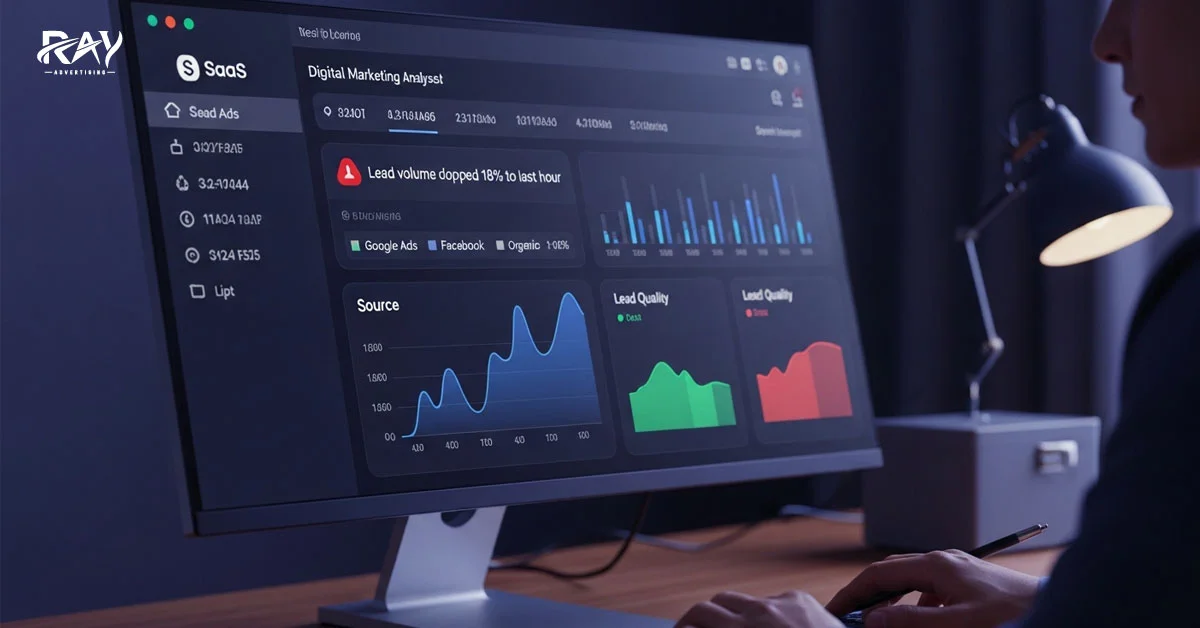
Ever feel like your leads are unpredictable? One week, they flood in. The next week, barely anything shows up. You follow the same process and spend the same money, yet the results keep changing. It's frustrating and makes planning almost impossible.
Most businesses face the same problem. Data sits everywhere. Emails, forms, CRM, ads, spreadsheets. No single place shows the full picture. That makes it hard to know what will happen next week or next month.
An internal dashboard fixes this. It brings your lead data together. You see what is happening in real time and spot patterns early. That makes your lead flow easier to predict.
In this article, you will learn how internal dashboards help teams act at the right time, reduce guesswork, and improve lead predictability.
What an Internal Dashboard Is
An internal dashboard is a simple screen that shows your lead data in one place. It collects information from the tools you already use, like forms, your CRM, and ad platforms. Instead of checking multiple systems, your team can see everything on a single page.
The dashboard shows numbers from your campaigns. You can see how many leads arrived, where they came from, and when they entered the system. It also shows how those leads move through your process. The data updates as new leads come in.
This is different from spreadsheets or manual reports. Spreadsheets often need someone to export data, copy it, and update it by hand. That takes time, and the information can become outdated. An internal dashboard updates automatically, so your team always sees the latest data.
Why Lead Predictability Fails Without a Dashboard
You want steady leads, but without a clear view of your data, it's hard to know what's coming next. Many teams face the same challenges.
Fragmented data across tools
Your leads may come from forms, ads, or landing pages, while sales teams track them in a CRM. When all this information isn't connected, it's hard to see how leads move through your process. Without that visibility, predicting future lead flow becomes difficult.
Delayed reporting
Waiting for weekly or monthly reports can cost you. By the time you see the numbers, the situation may already have changed. Drops or spikes in leads can go unnoticed until it's too late.
No daily visibility
Without a dashboard, it's easy to miss problems as they happen. Teams may only notice issues after several days. This delay makes planning and forecasting much harder.
Decisions based on gut, not data
When data isn't clear, decisions rely on gut feelings. You may think a campaign is working or failing without real evidence. These guesses often lead to wasted time, missed opportunities, and unpredictable lead flow.
How Internal Dashboards Drive Predictability
Getting a steady flow of leads doesn't happen by chance. Your team needs a clear view of what's happening with leads at every moment. An internal dashboard turns scattered data into simple, real-time insights.
Here's how internal dashboards help your team spot patterns, act faster, and make lead flow more predictable:
1. Centralized Lead Data
An internal dashboard consolidates lead information from all your sources into a single place. Data from forms, ad platforms, and your CRM appear together, so your team doesn't have to jump between tools.
The dashboard updates automatically as new leads arrive. This means your team can see changes quickly and track how leads move through the day. Clear visibility like this makes trends easier to track and improves lead predictability.
2. Real-Time Performance Signals
Real-time data shows lead activity as it happens. When a new lead enters the system, the dashboard updates immediately. Your teams don't have to wait for end-of-day or weekly reports.
This helps your team act fast and predict leads more accurately. For example, they can quickly notice:
- Sudden drops in lead volume
- Campaigns performing better than expected
- Unusual patterns that need investigation
You and your team see changes instantly. You can adjust strategies right away. This makes the lead's progress through the process smoother.
3. Lead Quality Scoring
Lead quality scoring gives each lead a rating based on factors such as source, engagement, and form details. Higher scores indicate leads that are more likely to convert.
Dashboards make it easy to track these scores over time. Your team can see:
- Which lead sources deliver the highest quality
- Trends in lead engagement over days or weeks
- When low-quality leads are increasing
By monitoring these patterns, your team can focus on the best opportunities and improve both lead quality and predictability.
4. Historical Patterns and Trends
An internal dashboard lets you check past weeks and months to see how leads have behaved over time. You can spot trends, such as which campaigns bring the most leads or which days are slow.
By comparing past performance, your team can quickly notice peaks and drops. This helps you plan more effectively, adjust strategies, and improve lead flow.
5. Align Team Actions with Lead Flow
The dashboard shows exactly when your lead volume is highest during the day. You can see patterns like:
- 60% of your leads arrive between 9:00 AM and 11:00 AM.
- Average time leads stay in the "new" status.
With this insight, you can schedule your best salespeople to focus on the busiest hours. If the time a lead stays "new" gets too long, your team knows they need to act faster to stay in sync with the flow.
This way, everyone is aligned, fewer leads are missed, and your leads move through the process more smoothly.
Internal Dashboards vs External Tools
Not all tools are created equal when it comes to predicting lead flow. External tools can give you data, but it's often delayed and generic. Internal dashboards, however, are built around your team's process. They provide real-time insights, track the metrics that matter, and help you act quickly.
Here's a quick look at how internal dashboards stack up against external tools:
|
Feature |
External Tools |
Internal Dashboards |
|
Data updates |
Often delayed |
Real-time updates |
|
Customization |
Limited |
Built for your process |
|
Metrics |
Generic |
Tracks what matters to your team |
|
Predictability |
Hard to rely on |
Easier to forecast lead flow |
|
Actionability |
Reactive |
Enables immediate decisions |
With internal dashboards, your team can spot trends faster. You can adjust strategies right away. This makes lead flow more predictable, something external tools alone can't provide.
How We Build Dashboards for Better Predictability
We design dashboards to give your team a clear view of leads and make daily work easier. Here's how we set them up:
1. Data Sources We Integrate
We pull lead information from all the tools you already use—your CRM, forms, and ad platforms. Everything comes together in one place, so your team doesn't have to check multiple systems.
2. Metrics We Include
We track the numbers that matter most to your team. This includes lead volume, engagement, source quality, and conversion trends. By focusing on meaningful metrics, the dashboard highlights patterns you can act on.
3. How Often We Update
Our dashboards update automatically in real time. As new leads arrive, your team sees the changes instantly. This keeps everyone informed and able to respond without waiting for reports.
4. How Teams Use It Daily
Teams use dashboards every day to plan actions, adjust schedules, and prioritize high-quality leads. The setup makes data easy to access and understand, so your team can make informed decisions quickly.
Avoid These Dashboard Mistakes
Even with dashboards, many companies struggle to make lead flow predictable.
Here are some common pitfalls:
- Tracking clicks, not quality
- Not updating dashboards daily
- Too many vanity metrics
- Not training teams to use it
Avoiding these mistakes ensures your dashboards work as they should. Your team can respond faster, focus on high-quality leads, and improve lead flow.
Best Practices to Improve Predictability
To make your lead flow more predictable, using a dashboard isn't enough. You need a few smart habits. Here's what works best:
- Set core lead metrics: Focus on the numbers that matter, like lead volume, quality, and conversion rates. This keeps your team aligned on what really drives results.
- Daily review habit: Check the dashboard every day. Seeing trends and changes early lets your team act before small issues become big problems.
- Use alerts for drops: Set up notifications when lead volume or quality drops. This helps you respond quickly and prevent missed opportunities.
- Align the dashboard with your sales stages: Ensure it reflects your actual sales process. When each stage is visible, your team can prioritize the leads that matter most.
Following these practices helps your team stay proactive, focused, and in sync, so lead flow becomes easier to predict.
Turning Data into Predictable Leads
Predictable leads don't happen by chance. Internal dashboards give your team clear, real-time insights. You can spot trends, act fast, and focus on the leads that matter most.
Track the right metrics, check the dashboard daily, and keep your team in sync. When everyone can see what's coming and act on it, lead flow becomes simple and predictable
Recent Post
How to Scale Lead Generation Without Losing Qualit...
August 17, 2026
Improve Lead Generation Quality Without Losing Vol...
August 16, 2026
Reduce Cost Per Acquisition: 12 Tactics That Work...
August 14, 2026
Reduce Cost Per Acquisition: 12 Tactics That Work...
August 13, 2026
Car Insurance Leads for Agents: Best Sources and S...
August 12, 2026
What Are SR22 Insurance Leads and Why Are They So ...
August 11, 2026

Auto Insurance Pay Per Call: How It Works and Why ...
August 10, 2026
How to Buy Auto Insurance Leads That Actually Conv...
August 9, 2026
High Risk Auto Insurance Leads: How to Target and ...
August 8, 2026
Related resources
Explore the most relevant pages based on this article.
- Contact Ray Advertising — Ask about pricing, compliance, and launch timelines.
- Lead Generation — High-intent leads with delivery and quality controls.
- Pay Per Call — Qualified inbound calls with tracking and routing.
- Media Buying — Performance media with optimization and attribution.
- Affiliate Network — Vetted publishers and fraud protection.

FAQs
Quick answers related to this article.
We support lead generation, pay per call marketing, media buying, and affiliate network programs.
We use source attribution, quality metrics, and conversion reporting to optimize and scale profitable traffic.
Contact our team or sign up as an advertiser or publisher to begin onboarding.

